When you transcribe YouTube video to text, spoken content becomes searchable, reusable, and highly valuable. A clear transcript helps content creators, students, and marketers boost efficiency and expand reach.
Part 1: Why You Should Transcribe YouTube Video to Text
- Enhance search and findability: As your content can be perceived by search engines, adding a transcript allows moving it to a higher position in the ranking by such keywords as YouTube transcript generator and other related searches.
- YouTube video to text: Transcribe the video, and instantly transform the videos into blog posts, other social media content, or newsletters without having to create a new post.
- Increase accessibility and participation: Transcripts and subtitles help to follow the content with non-native speakers and people with hearing impairments, which enhances the user experience in general.
- Spend less time watching the content: A user is able to save time reading a transcript, skimming a text, and finding essentials, and reading an extended video is more time-consuming.
- Support learning and documentation: The structured video transcript facilitates easier note taking, organization of ideas as well as reuse of information to perform research or work in a professional field.
Altogether, transcribing video to text free or AI-based tools have become an easy yet efficient means of enhancing the process of content creation, sharing, and consumption.
Part 2: Use Cases for Transcribing YouTube Video to Text
Videotext Transcription opens a broad spectrum of applications in product production, education and business work procedures.
- Turn YouTube videos into blog posts: When transcribing a video on YouTube, you can convert audio files and speech recognition to text in a flash, and then you can be able to use your time to write a post and increase the rate of search.
- Make subtitles more accessible and interactive: On one hand, a video transcript can be transformed into subtitles rather easily, allowing viewers to track the video, as well as spend more time watching it, particularly in the mobile or silent setting.
- Gather essential conclusions in the educational material: It is possible to scan the transcripts and extract the most important information without watching the video as a whole, which will make the process of acquiring knowledge more efficient and quicker.
- Reuse social media content: You can use transcripts to extract quotes, highlights, or bites to compose an engaging social media post on LinkedIn, Twitter, or Instagram.
- Develop knowledge base and documents: Transcripts provide businesses with the means of recording a webinar, training session or tutorial and that information is easier to store, search and reuse.
In general, transcription software to create video transcript generators free or through AI can be useful to convert video material into reusable content to be used in various outlets.
Part 3: Transcribe YouTube Video with Video Transcription Tool
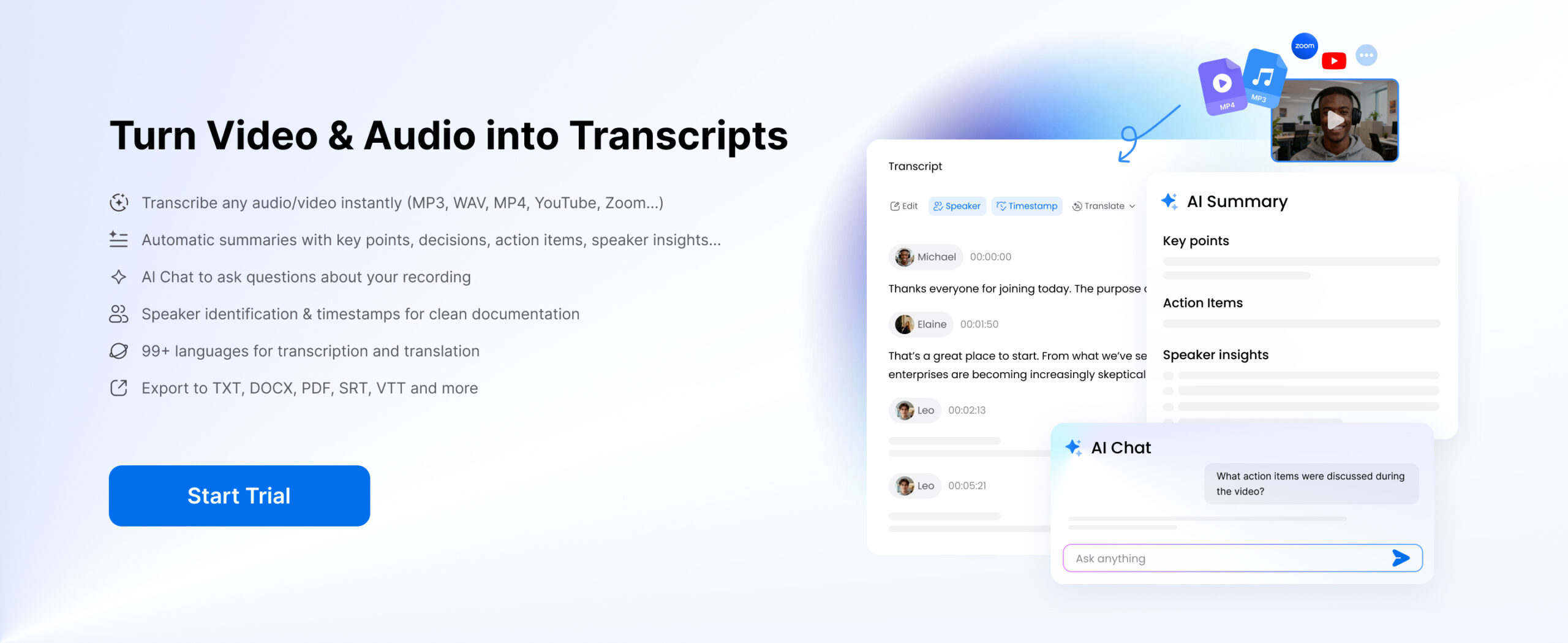
Video transcription tool provides a more advanced and reliable way to convert YouTube videos into text. Instead of relying on captions, these tools process audio directly using AI, resulting in higher-quality output.
Some platforms also offer browser extensions, combining convenience with powerful AI processing for faster workflows.
Key advantages
- Higher accuracy compared to caption-based methods
- Ability to handle long videos (even hours of content)
- Multi-language and accent support
- Structured output with punctuation and formatting
- Advanced features like summaries, speaker identification, and subtitle export
Best for: Users who need accurate, editable, and scalable transcripts
This method is widely used by creators, marketers, and professionals who rely on high-quality video transcript output for publishing, analysis, or content production.
Each method serves a different purpose, but the differences become clear when you need higher accuracy, cleaner formatting, or reusable content. Basic options work for quick reference, but they often require manual editing and don’t scale well as your needs grow.
That’s why more users are turning to AI-powered solutions to transcribe YouTube video to text more efficiently.
Now, using Clipto.AI, we’ll walk you through the detailed steps to transcribe YouTube videos to text.
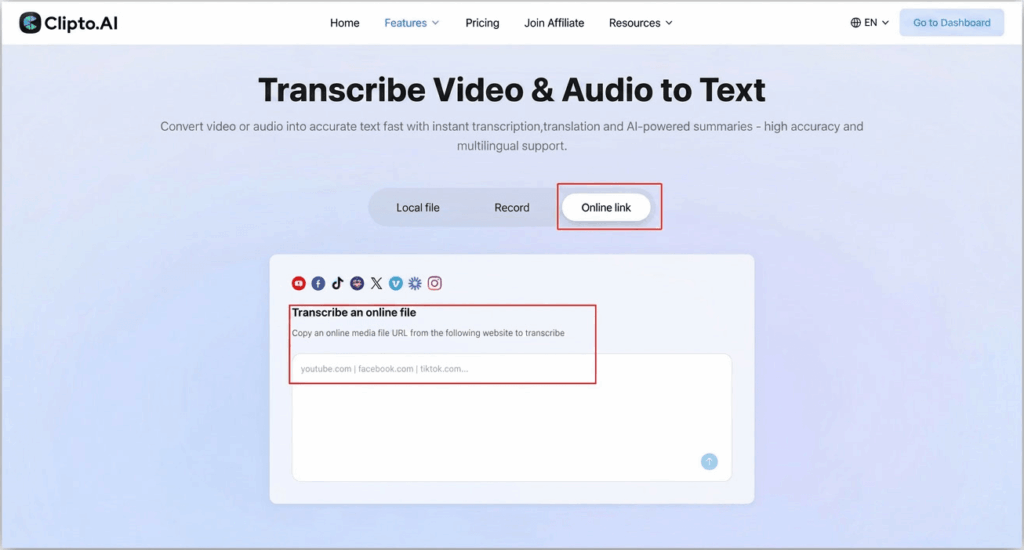
Step 1: Upload the YouTube Video Link to Clipto
Visit the Clipto.AI transcription page and paste the YouTube link into the online transcription box. The platform will automatically recognize and import the video.
Then click the transcription button to let the AI analyze the audio and generate a text transcript within a few minutes.
Step 2: Get the YouTube Transcript and Improve the Transcript
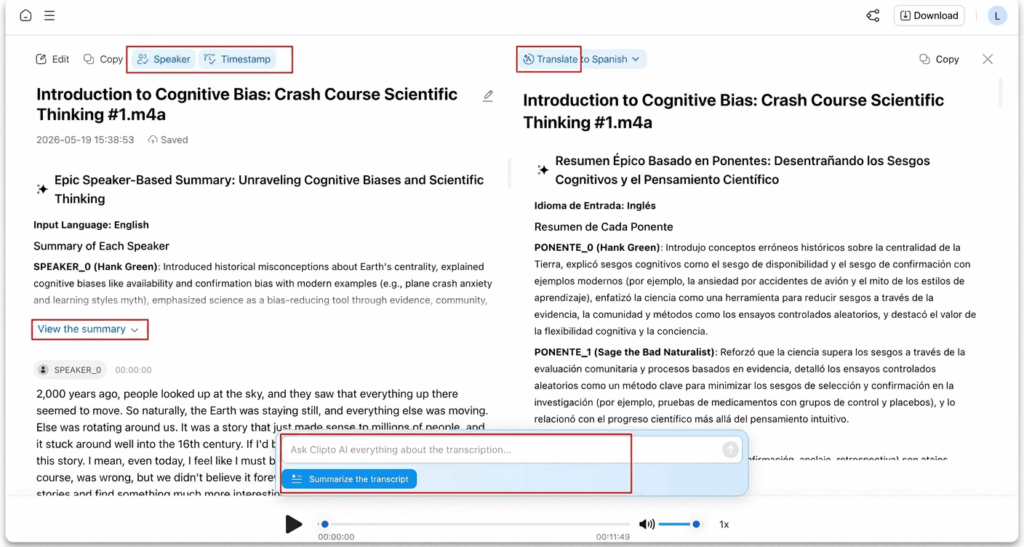
After the transcript is generated, you can refine the text using features like timestamps, speaker labels, translation into other languages, AI summaries, and AI chat to quickly understand the video content or find specific information you need.
Step 3: Download or Reuse the YouTube Transcript
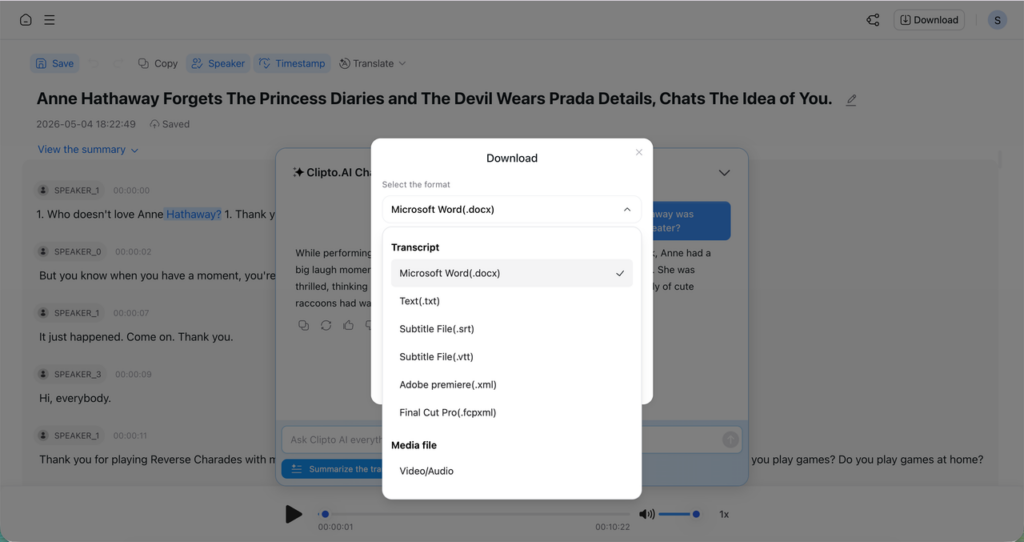
Export the final transcript in formats such as TXT, SRT, or VTT for subtitles, research, blog writing, documentation, or content repurposing.
Part 4: Transcribe YouTube Video with YouTube Auto Captions
Video transcription tool provides a more advanced and reliable way to convert YouTube videos into text. Instead of relying on captions, these tools process audio directly using AI, resulting in higher-quality output.
YouTube automatically generates captions for many videos using its built-in speech recognition system. These captions can be accessed as a simple transcript.
How it works
- Open a YouTube video
- Click “Show transcript”
- Copy the text manually
Pros
- Completely free
- No setup required
- Instant access
Cons
- No formatting or structured output
- Cannot export easily
- Cannot get full transcript
- Not suitable for long or professional use
Best for: Quick reference or casual viewing
This method is useful if you only need to glance at content, but it lacks the quality needed for serious work or content reuse.
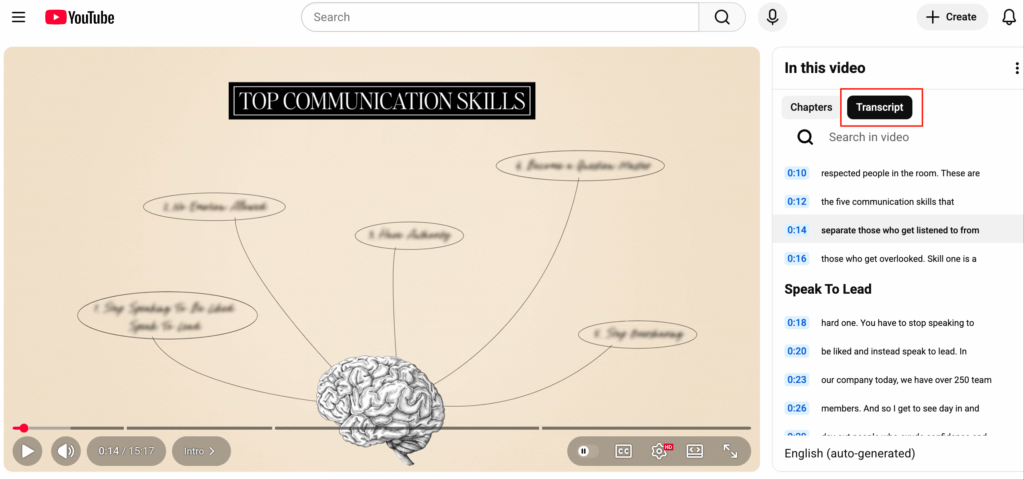
Step 1: Open the YouTube video, then click the “View Chapters” button below the video progress bar.
Step 2: Click Transcript to get the YouTube transcript.
Part 5: Transcribe YouTube Video with Browser Extensions
Browser extensions and simple YouTube transcript extractor tools allow you to quickly pull transcript text from a video without manually copying everything.
How it works
- Install an extension or open an extractor website
- Navigate to the YouTube video
- Extract the transcript with one click
Pros
- Faster than manual copying
- Easy to use with minimal setup
- Often free or low-cost
Cons
- Still relies on YouTube caption data
- Limited improvement in accuracy
- No advanced features like summaries or restructuring
- Not ideal for long or complex videos
Best for: Basic transcript extraction with minimal effort
While this method improves convenience, it does not solve deeper problems like accuracy, formatting, or scalability.
Step 1: Open a YouTube transcript extractor or install a browser extension, like YouTube Transcript.
Step 2: Paste the YouTube video link (or open the video page).
Step 3: Click to generate or extract the transcript
These tools improve speed and usability, especially for quick YouTube transcript download, but they still rely on caption data and offer limited accuracy improvements.
Conclusion
YouTube video content has become a significant aspect of contemporary working processes, be it in search engine optimization or content-making or education. Rather than depending upon time-consuming and imprecise solutions, the appropriate methodology can assist you to transform any video into a structured and reusable text in a few minutes.AI-based tools are the best option in case you want a quick, precise and scalable means of creating a transcript of a YouTube video into text. Create clean transcripts, summaries and ready-to-use content – and create value and actionable insights out of every video: start using a platform such as Clipto.Ai today to transcribe YouTube video.
FAQ
1. What is the fast way to transcribe YouTube video to text?
The quickest method that can be used to transcribe YouTube video to text is through an AI-based transcription service. These applications enable one to copy a video link and automatically create a structured transcript in just several minutes. The AI solutions are more time-saving and do not need editing (or do it minimum) compared to manual methods, particularly when the audio is clear.
2. Are YouTube videos free to transcribe?
It is true that you can transcribe YouTube video without charges using in-house captions or easy online transcribers. Nevertheless, such strategies usually are based on the existing subtitle data, which can contain mistakes or be not properly formatted. Basic work is appropriate with the free options, but the accuracy might fall short with the professional work.
3. Which is the most effective YouTube transcript generator AI?
The top YouTube transcript generator AI is the one that offers optimal accuracy, processing speed, and other practical options such as summaries and exporting options. Clipto.Ai is another tool that is widely used to process lengthy videos and create clean and structured video transcripts that can be used to create new content or record.
4. Is it possible to download a transcript of a video on YouTube?
Yes, a transcript can be downloaded through copying it to YouTube or with the help of online tools assisting in YouTube transcript download. Most AI tools also enable you to save transcripts in such formats as TXT, DOCX, or SRT, which eases the process of editing, sharing, or reusing the material.
5. What is the accuracy of AI tools in the video transcription?
High accuracy can be attained with AI transcription tools in case the audio is clear and well-recorded. Background noises, multiple speakers, and strong accents can influence the results, but advanced tools keep on improving, and in most cases, they will give almost human-like quality in transcription.